

WordPress or modular system 2025? This tool will help you decide in 5 minutes
by Tobias Berger / updated 05.10.2025 / 6 min. Reading time
by Tobias Berger / updated 05.10.2025 /
6 min. Reading time
Was ist ein Baukasten – und welche Optionen gibt’s?
Ein Baukasten ist eine einfache Website-Lösung, bei der du ohne Programmierkenntnisse deine Seite selbst erstellst. Typische Merkmale:
- Drag & Drop: Inhalte einfach per Maus platzieren – ganz ohne Code.
- Alles inklusive: Hosting, Designvorlagen und Technik sind schon integriert.
- Wenig Aufwand: Ideal für kleine, klare Seiten – dafür weniger Tiefe bei SEO oder Export.
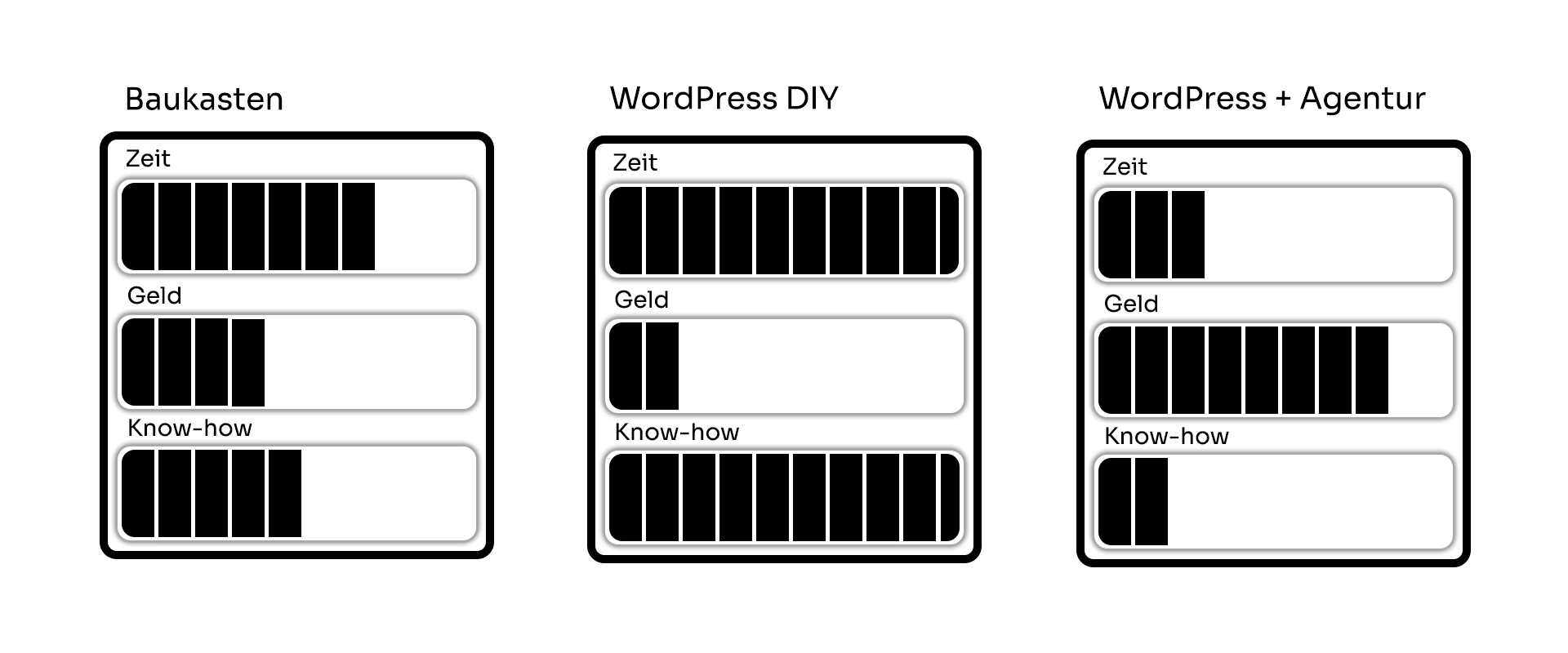
WordPress (DIY): Du hostest/managst selbst und bekommst volle SEO-Hebel, Blog-Power und Erweiterbarkeit. Etwas mehr Pflege (Updates/Backups), dafür langfristig flexibel.
WordPress (mit Agentur): Höherer Start-Invest, dafür Strategie, Umsetzung und Wartung aus einer Hand. Für KMU mit Ambitionen (Leads, Mehrsprachig, Content-Hub) meist am effizientesten.
Worauf es wirklich ankommt
Eigene Website heißt: Inhalte planen, saubere Struktur, klare Zuständigkeiten. Egal ob Baukasten oder CMS – was zählt sind guter Content, solide Technik und realistische Ressourcen für Pflege & Ausbau.
Leitfragen: Welche Ziele hat die Seite? Wer liefert Texte/Bilder? Wie wächst das System in 12–24 Monaten mit? Je klarer die Antworten, desto leichter die Tool-Wahl.
- Gesamtkosten: Denke in 3 Jahren inkl. Apps/Plugins, Wartung, ggf. Redesign.
- SEO & Content: Blog-Tauglichkeit, Ladezeit, interne Verlinkung, Datenstruktur.
- Pflege & Zuständigkeit: Inhalte & technische Updates – intern oder extern?
- Exit-Strategie: Export/Migration bedenken – spätere Wechselkosten sparen.
- Recht & Basics: Impressum/Datenschutz/Consent korrekt integrieren.
Schnell-Vergleich
| Option | Monatliche Kosten* | Aufwand (realistisch) | Geeignet für |
|---|---|---|---|
| Wix | ca. €13–30+ | 40–80 h | Micro-Sites, Portfolios |
| Squarespace | ca. €16–36 | 35–60 h | Design-Portfolios, Marken |
| Jimdo | ca. €15–45 | 20–40 h | Mini-Sites, einfache Seiten |
| Webflow | ca. €14–45+ | 50–120 h | Custom LPs, Markenauftritt |
| Shopify (Shops) | ca. €29–299 | 60–140 h | Shops 20+ Produkte |
| WordPress (DIY) | Hosting ~€8–25 | 80–200 h | Blogs, Content-Hubs |
| WordPress + Agentur | individuell (Wartung optional) | 5–10 h | KMU-Leads, Wachstum |
Wie entscheidest du dich jetzt?
1) Umfang & Ziele: Seitenzahl, Blog ja/nein, Shop jetzt/später, Mehrsprachigkeit, klare KPIs.2) Ressourcen: Wer liefert Texte/Bilder? Wer pflegt Technik & Inhalte – intern oder extern?
3) 3-Jahres-Plan: Welche Funktionen kommen dazu? Wähle eine Basis, die mitwächst.
Tipp für die Budgetplanung: Damit du Kosten realistischer kalkulierst und wirklich vergleichbare, ehrliche Angebote bekommst, lies unseren Leitfaden Website-Kosten & Budget 2025.
Weiter mit dem Rechner
Beantworte 4 kurze Fragen zu Umfang, Content, Zeit & Pflege. Am Ende erhältst du eine klare Empfehlung, welches Setup für dich am meisten Sinn macht (z. B. „Wix Business“ oder „WP + Agentur“).
Unsere Empfehlung: Agentur

📞 +43 677 62358962
Unsere Empfehlung: Wix

📞 +43 677 62358962
Unsere Empfehlung: Shopify

📞 +43 677 62358962
Unsere Empfehlung: WordPress

📞 +43 677 62358962
Die Anbieter im Vergleich
Hier findest du Plus/Minus der wichtigsten Optionen – schnell erfassbar, wenn du zwischen Baukasten, Webflow, Shopify und WordPress wählst. Brauchst du vor dem Entscheid mehr Kontext (z. B. Export, Wachstum, Pflegeaufwand), liefert die Tabelle darunter kurze, klare Einschätzungen. So kommst du zügig zu einer fundierten Wahl – und kannst Details später vertiefen.| Anbieter | Plus | Minus |
|---|---|---|
Wix |
|
|
Squarespace |
|
|
Jimdo |
|
|
Webflow |
|
|
Shopify |
|
|
WordPress (DIY) |
|
|
WordPress + Agentur |
|
|
Fazit & Nächste Schritte
Baukasten liefert Tempo und einfache Pflege, stößt bei Sonderfällen oder Export an Grenzen. Webflow glänzt im Design, verlangt mehr Know-how. Shopify ist die robuste Shop-Basis. WordPress (DIY oder mit Agentur) ist für Content und SEO am flexibelsten.
Starte jetzt den Rechner für eine klare Empfehlung und den nächsten Schritt. Lies auch unseren Hauptartikel „Website erstellen 2025 – Schritt-für-Schritt-Anleitung“für den kompletten Überblick und praktische Beispiele.

Why is WordPress 2025 better than a website builder?
WordPress is not a closed system, but an open content management system with full control over design, structure and SEO.
Unlike building blocks like Wix or Squarespace, you are not tied to one platform – you can export content, choose your own hosting and freely expand your site technically.
WordPress offers more freedom, better loading times and stronger Google rankings in the long term, especially for growing companies.
What does a professional WordPress website really cost?
The costs depend on the scope, design and desired functionality.
At BSC Webdesign, individual WordPress projects start from €995, including professional setup, responsive design and basic SEO optimization.
Packages for ongoing maintenance, multilingualism or online stores are calculated individually – transparently, without hidden fees.
How time-consuming is it to maintain a WordPress site on a day-to-day basis?
WordPress is easy to use – texts, images and blog posts can be customized without programming knowledge.
Technically, you should carry out regular updates (theme, plugins, core) to ensure security and performance.
If you don’t want to do this yourself, BSC Webdesign will take care of maintenance & security checks for you on request – so you can concentrate fully on your business.
When is WordPress with an agency worthwhile instead of do-it-yourself?
If you’re planning a website with clear goals, professional impact and long-term growth, it’s worth working with an agency.
DIY sites are ideal for trial and error – agency solutions, on the other hand, save time, avoid typical mistakes and ensure measurable results on Google & Co.
With BSC Webdesign, you get strategy, design and technology from a single source – scalable and future-proof.
In this article
Hey, I'm Tobias!
Thanks for taking the time to read this post – really cool that you’re interested in website & web design!
You can find many more tips on design, technology and SEO on our blog. And if you have any questions or need support with your own website, we at BSC Webdesign are always happy to help.