

A URL is the exact Internet address of a page – i.e. the link that you see at the top of your browser. It takes you directly to a specific website or subpage (e.g. to the homepage or to a product).
Definition in one sentence:
A URL (Internet address) is the complete link that indicates exactly where a website or a specific page can be found on the Internet.
Clean, readable URLs are planned into every new site in our web design from Vienna.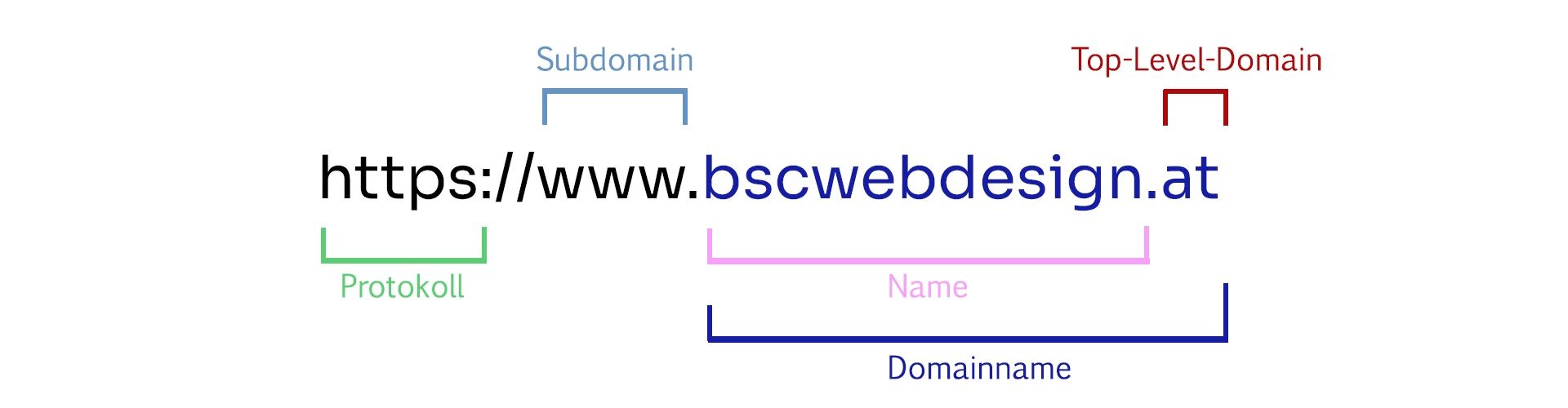
This is how a URL is structured: Protocol, subdomain, name and domain extension (top-level domain).
What exactly is a URL?
A URL is not just “the website address”. It is the complete address that tells your browser exactly where to go. This can be the homepage – or a very specific subpage such as a blog article, a contact page or a product.What parts does a URL consist of?
Most URLs consist of several parts. The graphic above shows the typical structure:- Protocol (https://) – shows how the connection is established (today almost always secure with https)
- Subdomain (www) – optional addition in front of the domain
- Domain name (bscwebdesign.at) – the name of the website
- Domain extension (.at) – e.g. .at, .de, .com
Important:
The URL usually also contains a domain. If you first want to understand what exactly a domain is, read on here:
What is a domain? Simply explained
.
And what is the “path” in a URL?
In addition to domain & protocol, URLs often have a part after the domain. This is the so-called path (sometimes also called “URL path” or “slug”). It shows exactly which subpage you are opening.Examples of URL paths:
- /contact → contact page
- /blog/what-is-a-url → a specific blog article
- /shop → Shop overview
- /product/name → specific product
Simply put: The domain takes you to the “house ” – the path takes you to the right “door” or the right “room” within the website.
Why are URLs important (also for SEO)?
URLs not only help the browser, but also people and Google. A clear URL makes it immediately clear what the page is about.- Understandable for visitors: You can recognize the topic by the link
- More shareable: clean links look more serious
- SEO: clear paths and suitable terms help with classification
- Structure: good URLs show the logic of your website (e.g. /blog/…)
Tip:
If you are currently planning a website and want to set up the structure correctly (pages, URLs, navigation, content), our complete guide will help you:Create website 2025 – step-by-step guide
.
Typical URL errors (which you should avoid)
These mistakes are particularly common with beginner websites:- URLs that are too long: e.g. /page-1/page-2/page-3/whatever
- Unclear characters: many numbers or cryptic parameters
- Umlauts & special characters: often lead to “strange” links
- No structure: everything directly on one level without /blog/ or /shop/
- Change without redirection: then 404 errors occur (bad for users & SEO)
Conclusion: A URL is the exact address of a page
A URL is the complete link that takes you to a specific website or subpage. If you create your website yourself, make sure you use simple, clear URLs – then visitors (and Google) will understand more quickly what the page is about.Next step:
If you want to plan your website structure, page layout and content properly, use our guide:Create website 2025 – step-by-step guide
.
FAQ – short & simple
What is a URL simply explained?
A URL is the Internet address of a page. It is the link that you see in the browser and can click on or share. A URL not only leads to a website in general, but often to a very specific subpage – for example to a contact page, a blog article or a product. This is exactly why a URL is so important: it shows you exactly where you are on a website.What is the difference between URL and domain?
The domain is the name of the website (e.g. bscwebdesign.at). The URL is the complete address including protocol and often including the path – e.g. https://bscwebdesign.at/blog/was-ist-eine-url. Simply put: the domain is part of the URL, but the URL is more because it also contains the exact location (path). More about this here: What is a domain?What does https mean in a URL?
“https” is the protocol and stands for a secure connection. It ensures that data is transmitted in encrypted form. Today, https is standard for modern websites because it creates trust and browsers can otherwise display warnings. For you as a website creator, this means: make sure that your website is always accessible via https.What is a URL path (e.g. /shop or /contact)?
The path is the part of the URL that comes after the domain. It shows which subpage you are opening. Examples are /contact, /shop or /product/name. Good paths are short and clearly describe the content of the page. This helps visitors and can also support SEO because the link is immediately understandable.Which URL is good for SEO?
SEO-friendly URLs are short, understandable and contain meaningful words instead of cryptic characters. For example, /blog/what-is-a-url is better than /?p=123. It is also important to have a clean structure (e.g. /blog/ for blog articles) and that you do not constantly change URLs. If you do change something, you need redirects to avoid 404 errors.Can I change a URL later?
Yes, you can – but be careful. If you change a URL, old links no longer work automatically. This can annoy visitors and cost SEO because Google and other websites still know the old address. That’s why you should always set a redirect (301) from the old URL to the new one when making changes. If you are planning your website, it is best to define URLs clearly from the start.