
Austrian Accessibility Act: What it means for your website
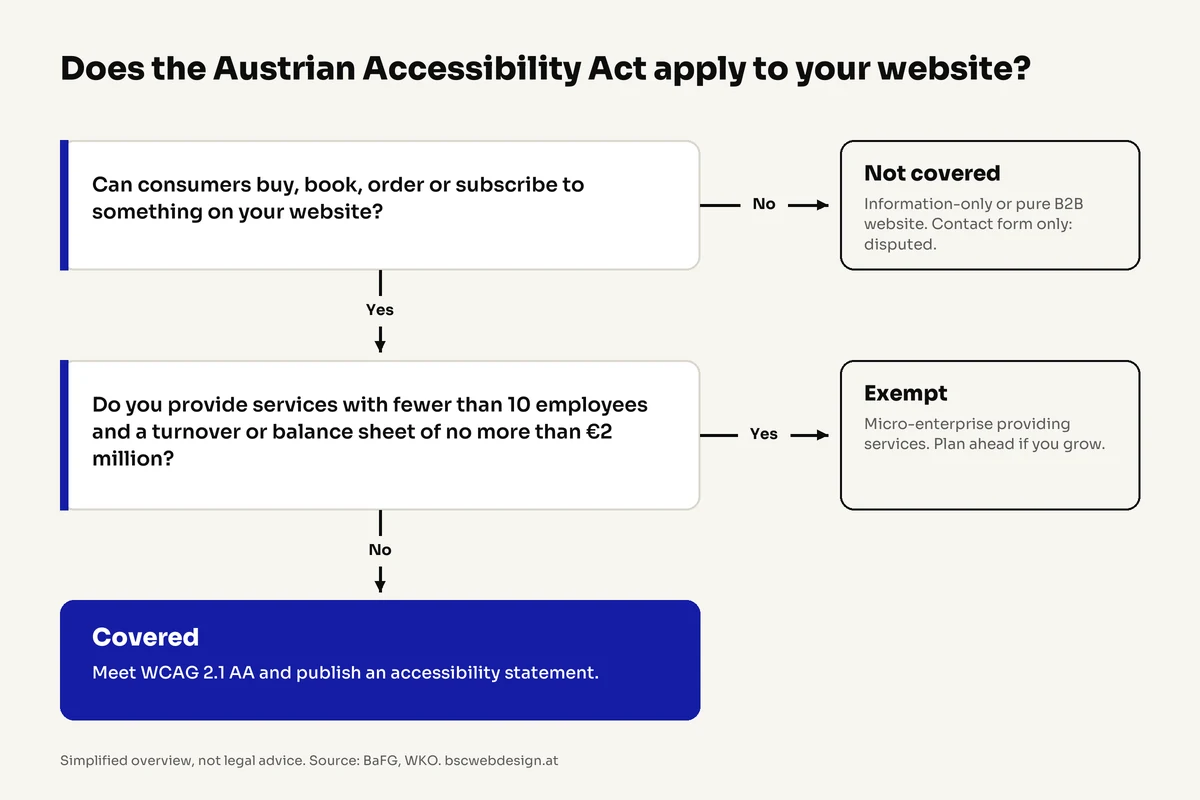
Does the Austrian Accessibility Act apply to my website? Since 28 June 2025, websites in Austria must be accessible if consumers can buy, book or order something through them: online stores, booking and appointment tools, and subscription offers. Purely informational websites, B2B-only offers and service-providing micro-enterprises (fewer than 10 employees and no more than EUR 2 million in turnover or balance sheet total) are exempt.
The Austrian Accessibility Act (Barrierefreiheitsgesetz, BaFG) is Austria’s implementation of the European Accessibility Act. If you run a business in Austria or sell to Austrian consumers, this guide explains in plain English whether you are affected, what “accessible” means technically, what the penalties are and how to get started.
1. What the Accessibility Act is
The Barrierefreiheitsgesetz (BaFG, Federal Law Gazette I No. 76/2023) transposes the EU’s European Accessibility Act (Directive 2019/882) into Austrian law. It has applied since 28 June 2025 and requires businesses to design certain products and services so that people with disabilities can use them without assistance, for example people using a screen reader, navigating by keyboard only, with low vision or colour blindness.
The key point: the law does not regulate “websites” as such, but specific services. For most businesses the relevant one is e-commerce services provided under a consumer contract, in other words anything that lets consumers enter into a contract with you online.
Separately, Austria’s Disability Equality Act (Behindertengleichstellungsgesetz, BGStG) prohibits discrimination in access to goods and services and can apply to websites outside the BaFG as well. Breaches are not an administrative offence, but can lead to conciliation proceedings and damages claims.

2. Is your website affected?
This overview is based on guidance from the Austrian Economic Chamber (WKO, as of 1 February 2026). It is not legal advice, but it shows you quickly where you stand.
- Affected: Online stores selling to consumers (B2C).
- Affected: Websites with booking or appointment features, e.g. hotels, travel, courses or consultations.
- Affected: Sales of digital memberships, subscriptions, e-books and digital publications.
- Affected: Apps with the same functions.
- Not affected: Purely informational websites without a shop, ordering or booking option.
- Not affected: B2B-only offers aimed exclusively at businesses.
- Not affected: A legally required Impressum (imprint) alone does not bring a website under the BaFG.
- Disputed: Websites whose only interactive element is a contact form.
The contact form question: Experts disagree. A strict reading treats an interactive contact form as an e-commerce service; the opposing view says a form that only triggers a manual reply is not enough. Authorities have not settled this yet. The WKO pragmatically recommends making at least the contact form itself accessible. It takes little effort and removes the risk.
No transition period for online stores: There are no transitional provisions for online stores and websites with ordering or booking features. The law applies to all orders and bookings since 28 June 2025. Exceptions exist only for certain content, such as office documents like PDFs not primarily intended for the web, and videos published before that date.
3. The micro-enterprise exemption
Micro-enterprises that provide services are exempt from the BaFG (Section 6(1) BaFG). A micro-enterprise has
- fewer than 10 employees and
- annual turnover or an annual balance sheet total of no more than EUR 2 million.
Employees are counted in annual work units: part-time and seasonal staff count proportionally, apprentices do not count. The exemption applies to the company, not to an individual online store.
- Services only: Micro-enterprises that manufacture, import or distribute products covered by the law (e.g. e-readers or self-service terminals) are not exempt.
- Information on request: Micro-enterprises do not have to document their assessment, but must provide the relevant facts to the Sozialministeriumservice if asked.
- Plan for growth: Once you exceed the thresholds, the law applies. If you are building or relaunching a website now, plan accessibility in from the start. Retrofitting is almost always more expensive.
4. What “accessible” means technically
The BaFG does not prescribe a technical standard itself. However, conformity is presumed if you meet the harmonised European standard EN 301 549, which refers to WCAG 2.1 level AA (Web Content Accessibility Guidelines) for websites. The WKO recommends applying the current version, WCAG 2.2.
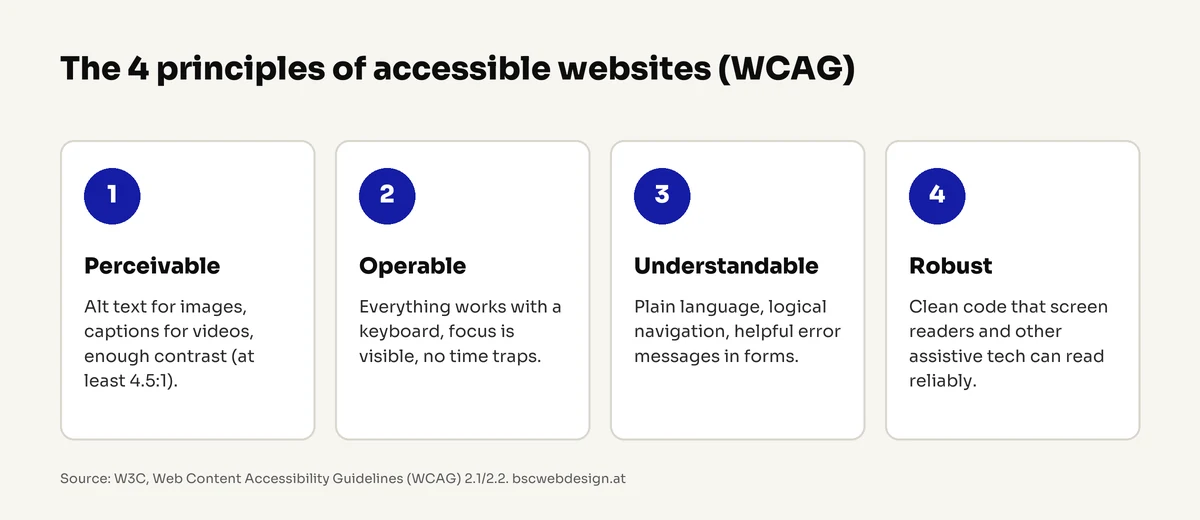
WCAG is built on four principles. Content must be
- perceivable: images have alt text, videos have captions, text has sufficient contrast.
- operable: everything works with a keyboard alone, focus is visible, nothing times out too quickly.
- understandable: clear language, predictable navigation, helpful error messages in forms.
- robust: clean code that screen readers and other assistive technologies can reliably interpret.
In practice, websites rarely fail on exotic requirements. They fail on the basics:
- Low contrast: light grey text on white or text over busy images. WCAG requires a contrast ratio of at least 4.5:1 for normal text.
- Missing alt text: images, icons and image buttons without descriptions are silent for screen readers.
- No keyboard access: menus, sliders, cookie banners or the shopping cart only work with a mouse.
- Invisible focus: keyboard users cannot see where they are on the page.
- Unlabelled forms: fields with placeholder text instead of real labels, errors shown only in red without text.
- Broken heading structure: headings chosen for looks instead of structure, so screen reader users lose orientation.
- Checkout barriers: CAPTCHAs without alternatives, time limits or payment steps that cannot be completed by keyboard.
What I see on client websites: especially on older sites built a few years ago, accessibility was sometimes left out completely. The law did not apply back then. So if you have a site like that, it is especially worth taking a close look.
A note on so-called overlay tools that add an “accessibility menu” via script: they do not replace an accessible build. The underlying problems in the code remain, and screen reader users often experience such tools as an additional barrier.
5. Mandatory conformity information
If the BaFG applies to you, your website must publish information on the conformity of the service (“Informationen über die Konformität der Dienstleistung”). It is a statement with legally defined minimum content that explains how and by which criteria your service meets the requirements, including an accessible description of the service and how it works.
The WKO advises against placing it in your terms and conditions, because Austrian consumer protection law applies to those. A separate page linked in the footer is the better choice. Your Impressum and all other mandatory information must be accessible too.
If part of your website can only be made accessible with a disproportionate burden, it may stay as it is for now under certain conditions. This assessment must be documented, mentioned in the conformity information and re-evaluated at least every five years. Authorities apply a strict standard here.
6. Enforcement and penalties
Market surveillance and administrative penalty proceedings are handled by the Sozialministeriumservice. It can review websites, identify shortcomings and require improvements. If you find that your service is not compliant, you must report this to the Sozialministeriumservice together with your planned corrective measures.
Fines of up to EUR 80,000 are possible (Section 36 BaFG), with lower maximum fines for small and medium-sized enterprises. For first-time or minor breaches, the principle “advice before penalties” applies: you will usually get the chance to fix the issues first.
Beyond fines, there is a business case: according to Statistics Austria, almost a quarter of people aged 15 to 89 in Austria (24.7%, around 1.9 million) had health-related limitations in everyday activities in 2024, many of them older people with declining eyesight or fine motor skills. A website they cannot use loses customers, regardless of the law.
7. How to get started
- 1. Check whether you are affected: Do you sell or broker services online to consumers? Are you a micro-enterprise? Write down your answer.
- 2. Assess the current state: A quick self-test (keyboard, contrast, alt text) reveals the biggest issues within an hour. For a full WCAG audit report, the WKO lists certified experts under “Certified WebAccessibility Expert”.
- 3. Fix critical paths first: Everything that leads to a transaction has priority: product search, cart, checkout, booking, contact form.
- 4. Build the basics into your design: Define colours, font sizes, focus styles and form fields once, and they work on every page.
- 5. Publish your conformity information: Create a dedicated page and link it in the footer.
- 6. Keep checking: New content, images and plugins can introduce new barriers. A quick check with every major change prevents regressions.
8. How we handle accessibility at BSC
For new websites and every website relaunch, we plan the accessibility basics from the start: sufficient contrast, keyboard navigation, visible focus, labelled forms and a clean heading structure. That is far cheaper than retrofitting later. We are a web design agency based in Vienna and work with businesses across Austria, in person in Vienna or via video call. If you want to know where your current website stands, we offer a free website check.
The best moment to build accessibility in from the ground up. Website relaunch with BSC
Online stores are the most common case under the Accessibility Act. Online store development
How we plan and build websites, from structure to launch. Web design from Vienna
An honest assessment of your website, including accessibility basics. Free website check
9. Checklist: Test your website’s accessibility
- 1. Keyboard test: Can you get through the menu, forms and checkout using only Tab, Enter and arrow keys?
- 2. Visible focus: Can you always see which element is currently selected?
- 3. Contrast: Does normal text have a contrast ratio of at least 4.5:1? (Free contrast checkers can test this.)
- 4. Alt text: Do all meaningful images, icons and image buttons have a description?
- 5. Forms: Does every field have a visible label, and do error messages explain in words what to do?
- 6. Headings: Is there exactly one H1, and do H2 and H3 follow the content structure?
- 7. Zoom: Does the page stay readable and usable at 200% zoom without horizontal scrolling?
- 8. Videos: Do videos with speech have captions?
- 9. Language: Is the page language set correctly in the code so screen readers pronounce it properly?
- 10. Conformity information: Is it published and linked in the footer (if the BaFG applies to you)?
Sources
- Barrierefreiheitsgesetz (BaFG), Federal Law Gazette I No. 76/2023, Austrian Legal Information System (RIS, German)
- Directive (EU) 2019/882 on the accessibility requirements for products and services, EUR-Lex
- Accessibility Act in e-commerce: FAQ, Austrian Economic Chamber (German)
- Information on the Accessibility Act, Austrian Economic Chamber (German)
- Barrierefreiheitsgesetz, Austrian Ministry of Social Affairs (German)
- Web Content Accessibility Guidelines (WCAG) 2.1 and WCAG 2.2, W3C
- EN 301 549 V3.2.1, ETSI
- 1.9 million people with disabilities in Austria in 2024, Statistics Austria (press release, 22 January 2026, German)
Information as of 30 October 2026.
Conclusion
The Austrian Accessibility Act mainly affects websites where consumers can buy, book or order. Informational websites, B2B offers and service-providing micro-enterprises are exempt; the contact form question remains open. If you are affected, follow EN 301 549 and WCAG, publish conformity information and fix the barriers on the path to a transaction first. And even without a legal obligation, accessibility pays off: it makes your website easier to use for everyone.
Want to know where your website stands on accessibility? Our free website check gives you an honest assessment and the most important issues at a glance.
FAQ
The most common questions about the Austrian Accessibility Act and your website.
When did the Austrian Accessibility Act come into force?
The Barrierefreiheitsgesetz (BaFG) has applied in Austria since 28 June 2025. There is no transition period for online stores and websites with ordering or booking features.
Does my company website have to be accessible?
Only if consumers can buy, book or order something online through it and you are not a micro-enterprise. Informational and B2B-only websites are not covered by the BaFG. Whether a contact form alone is enough is still legally open.
Does the law apply to small businesses?
Service-providing micro-enterprises with fewer than 10 employees and no more than EUR 2 million in annual turnover or balance sheet total are exempt. Larger small and medium-sized enterprises are covered, but face lower maximum fines.
What are the penalties?
The law provides for fines of up to EUR 80,000, with lower maximums for smaller companies. For first-time or minor breaches, “advice before penalties” applies, so you will usually be given the chance to fix issues first.
Which technical standard do I have to meet?
The reference is the European standard EN 301 549, which points to WCAG 2.1 level AA for websites. Implementing the current WCAG 2.2 is recommended.
Is an accessibility plugin or overlay enough?
No. Overlay tools add a menu for font size or contrast, but they do not fix the underlying problems in the code, such as missing labels or missing keyboard support.

This article provides a general overview (as of October 2026) and is not legal advice for individual cases.