
Website checklist: test your site in 15 minutes
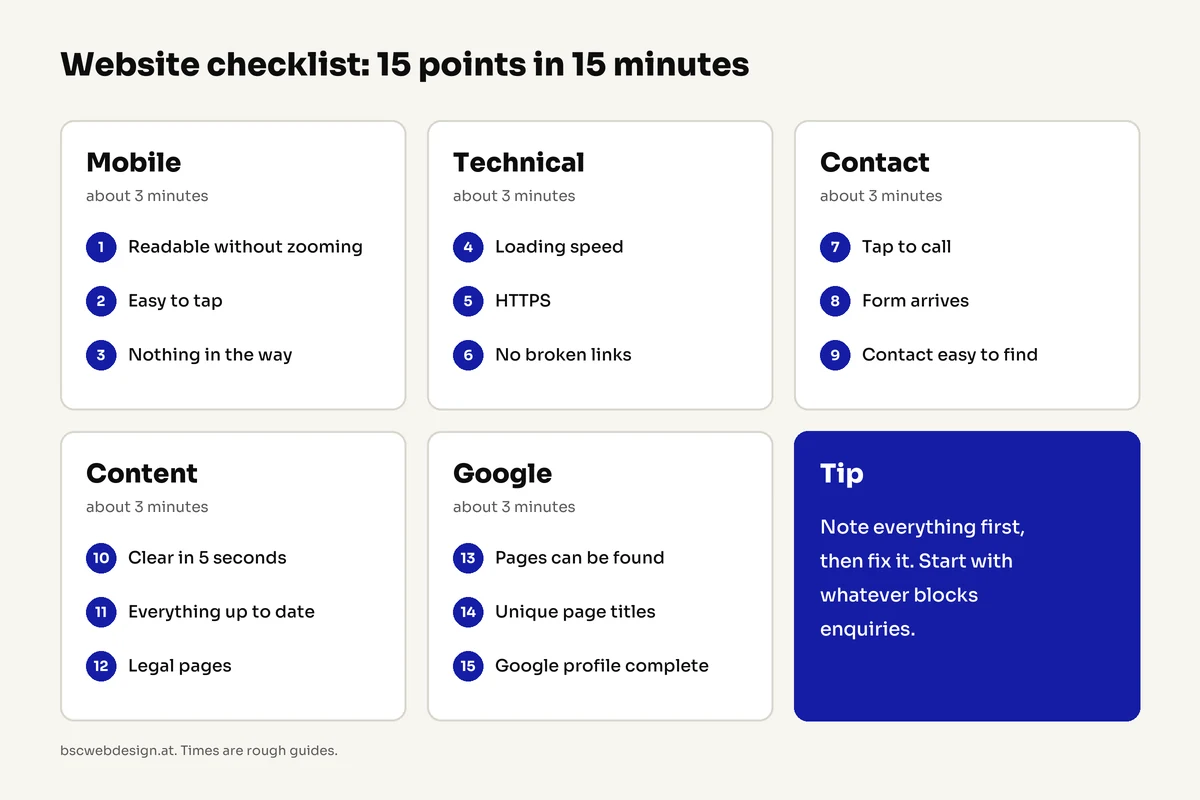
How can you test your website yourself? Grab your phone and a laptop, set aside 15 minutes and work through five areas: mobile, technical basics, contact, content and Google. You need no technical knowledge and no software, just one free tool from Google.
This checklist gives you 15 points, each with a simple yes or no question. By the end you will know what to fix first and what a self-test cannot show you.
1. How to run the test
Allow about three minutes per area. Write down only yes or no for each point and do not fix anything yet, or 15 minutes will quickly turn into an afternoon. Check your homepage first, then the page that should bring you the most enquiries, such as your main service.
If you can, test on your own phone using mobile data rather than office Wi-Fi. That gets you closer to what your customers see when they are out and about.
2. Mobile: points 1 to 3
This area comes first because it is also the version Google looks at: Google says it uses the mobile version of a site for indexing and ranking.
- 1. Readable without zooming: Can you read all the text without pinching to zoom, and without ever scrolling sideways?
- 2. Easy to tap: Can you hit menus, buttons and links on the first try? The WCAG web guidelines set a minimum target size of 24 by 24 pixels, and more is more comfortable.
- 3. Nothing in the way: Can you close cookie banners and pop-ups right away, and do you then see the most important content?
3. Technical basics: points 4 to 6
You will need the laptop for these three points, but nothing has to be installed.
- 4. Loading speed: Enter your address in PageSpeed Insights and look at the mobile result. The key number for you is Largest Contentful Paint (LCP): according to Google, the largest visible element should load within 2.5 seconds.
- 5. HTTPS: Does the address start with https, and do you end up there when you type it without https? Without a secure connection, Chrome shows a notice such as “Not secure”, and others could read or change the data.
- 6. No broken links: Click through every menu item and the footer. Does each link lead to the right page, or do you hit an error page?
4. Contact: points 7 to 9
This is where visitors should turn into enquiries. Faults here are easy to miss, because you never send yourself a message in day-to-day business.
- 7. Tap to call: Does the phone app open when you tap your number on your phone?
- 8. The form arrives: Send yourself a test enquiry, from your phone as well. Does it arrive, do you see a clear confirmation, and does it stay out of the spam folder?
- 9. Easy to find: Can you get to your phone number, email address or form in one click from every page?
5. Content and legal pages: points 10 to 12
For the first point, an outside view helps. Show the page to someone who does not know your business.
- 10. Clear in 5 seconds: Is it immediately obvious what you offer, who it is for and what to do next? The 5 seconds are a simple rule for this test, not a measured benchmark.
- 11. Everything up to date: Are prices, opening hours, team, services and photos still correct? Is there news or a blog that has been sitting untouched for years?
- 12. Legal pages: Can visitors reach your legal notice and privacy policy from every page? If your business is based in Austria, the Austrian E-Commerce Act says this information must be easily and directly accessible, according to the Austrian Economic Chamber (WKO). It includes your name or company, address, email and one further way to contact you, plus your company register and VAT numbers where you have them. What your privacy policy must cover in the EU is set out in Article 13 of the GDPR.
This point only checks that the information exists and can be found. Whether it is legally complete for your business is a question for a legal adviser.
6. Google: points 13 to 15
Finally, look at how your website and your business appear on Google.
- 13. Pages can be found: Search Google for
site:yourdomain.com. Do your important pages show up? Google notes that this list is not always exhaustive, so treat it as a rough signal only. - 14. Unique page titles: In the same list, does each page have its own title that says what the page is about? Google recommends unique, descriptive and concise titles, not the same one everywhere or just “Home”.
- 15. Google profile: Search for your business name. Is there a verified Business Profile, and are your address, opening hours and category correct? Google itself names complete and accurate details, photos and replies to reviews as ways to improve your local presence.
7. What we see most often in website checks
These five issues come up again and again in our website checks:
- Not optimised for mobile: This is what we see most. On a phone, the site simply shows the desktop view, only smaller, so text and buttons end up tiny (points 1 and 2).
- Oversized images: Images are very large and not optimised as WebP, which makes loading times much worse (point 4).
- Poor or outdated images: Sometimes the image quality leaves a lot to be desired, or the photos are very old (point 11).
- No Google profile: Very often there is none at all, so your listing with address and opening hours is missing from Google (point 15).
- Phone number not clickable: Phone numbers especially, and sometimes email addresses, are plain text. Anyone who wants to call you from their phone has to type or copy the number (point 7).
8. What to fix first
You will probably have a few noes on your list. That is normal. What matters is the order, and that depends on what is costing you right now:
- First: anything that blocks enquiries or damages trust. That means a form that does not arrive, a wrong phone number, missing HTTPS, a missing legal notice and error pages in your menu (points 5, 6, 7, 8 and 12).
- Next: anything that drives visitors away, such as mobile problems, slow loading and unclear copy (points 1 to 4, 9 and 10).
- Then: anything that builds visibility over time, including fresh content, page titles and your Google profile (points 11, 13, 14 and 15).
Plenty of this you can do yourself, like updating opening hours or completing your Google profile. Speed, HTTPS and broken forms usually need someone with access to the technical side. If the noes pile up and your site is already a few years old, it may be worth looking at web design from Vienna rather than patching each issue on its own.
9. What a self-test will not show
These 15 points will catch the obvious faults, but they do not replace a fresh pair of eyes. You know your website too well to notice where strangers get lost. And from the outside you can hardly tell whether your pages are technically sound, for example their headings or redirects.
This list does not cover accessibility either. If people can buy or book from you online, also read our article on the Austrian Accessibility Act.
Sources
- Web Vitals, Google (web.dev)
- Mobile-first indexing best practices, Google Search Central
- Influencing your title links in search results, Google Search Central
- Improve your local ranking on Google, Google Business Profile Help
- Understanding SC 2.5.8: Target Size (Minimum), W3C
- Informationspflichten nach dem E-Commerce-Gesetz (in German), Austrian Economic Chamber
- General Data Protection Regulation (EU) 2016/679, EUR-Lex
Information as of: 2 November 2026.
Conclusion
Testing your own website takes 15 minutes and costs nothing. The points that matter most are the ones that directly affect enquiries: your form, phone number, mobile view and loading speed. Fix what is costing you customers first, and run the test again whenever something bigger changes on your site.
With our free website check, we look at the design, loading speed, mobile view and SEO basics of your site. You get our assessment within 24 hours.
FAQ
Quick answers to the most common questions about testing your own website.
How can I test my website for free?
PageSpeed Insights from Google covers loading speed. The rest you can check yourself: click through on your phone, send a test enquiry, find your legal pages and search Google for your domain and business name.
What is a good result in PageSpeed Insights?
Focus on the measured values. Google says LCP should be 2.5 seconds or less, INP 200 milliseconds or less and CLS 0.1 or less. Always look at the mobile view.
How do I know if Google can find my website?
Search Google for site:yourdomain.com to see which pages it shows. The list is not always complete. The free Google Search Console gives you more precise data.
How can I tell if my website connection is not secure?
The address will not start with https, and Chrome shows an icon or a notice such as “Not secure” next to it. In that case, the SSL certificate needs setting up and the redirect to https needs checking.
Does this self-test replace a legal review?
No. It only checks that your legal notice and privacy policy exist and are easy to find. Whether the details are complete depends on your business and, if in doubt, is a matter for legal advice.